What you can do on the watch
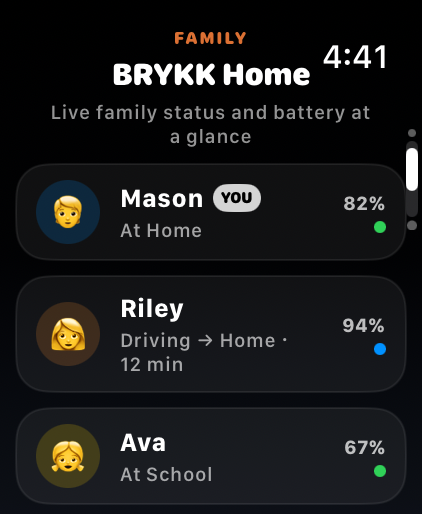
- Family glance — see who is home, who is driving, and who is low on battery from one compact list
- Direct talk — hold the talk button to speak into the family channel without opening chat on the phone
- SOS entry — hold to trigger SOS from your wrist with visible confirmation on the watch
- Crash awareness — the watch can mirror active crash and SOS states from the family
Core screens
The current watch app has three simple jobs: family status, direct talk, and emergency entry. It is intentionally tighter and calmer than the phone.


How it works today
Today, BRYKK on Apple Watch is a companion app. It mirrors family state from the iPhone, lets you use direct talk, and gives you a fast emergency surface on your wrist.
💡
The watch is meant to be fast and glanceable. It complements the phone instead of trying to cram the full app onto your wrist.
Setup
Install BRYKK on iPhone first. On a paired Apple Watch, the watch app comes along automatically. Open BRYKK on the watch after the iPhone setup is complete and it will inherit the active family state from the phone.